Paul Murrell
University of Auckland, New Zealand
email: paul@stat.auckland.ac.nz
and
Volker Sorge
University of Birmingham, UK
email: V.Sorge@cs.bham.ac.uk
Data is everywhere and its communication and understanding is an important pre-requisite for the full participation of individuals in the information age. Good data visualisation is commonly used to great effect for the sighted world, but are practically useless to a blind audience. Blind people are at risk of being left behind if efforts are not made to improve the access to information that is not traditionally conveyed in text, whether that text be accessed in braille, audio, or a computer's screen reading software. Our work aims to provide an accessible way for blind users to easily, efficiently, and most importantly accurately, explore and query the data contained in diagrams such as bar charts, box plots, time series, and many more. We employ the statistical software environment R not only as a means to generate accessible diagrams, but also as a way for blind users to directly interact with data in the same way as their sighted peers by supporting immediate data visualisation via screen reading and interactive exploration.
It has been argued in (Godfrey and Loots 2015) that blind people need to become producers of graphics, not just consumers of the information in those graphics if they are to have the same opportunities and outcomes in education and employment as their sighted peers take for granted. If blind people are to have employment prospects similar to those of their sighted peers, they must have confidence producing graphs independently, effectively, and efficiently. They must know that graphs produced for an audience look like the graphs that their audience expects to see.
This is particularly true in areas where working with graphics is an integral part of everyday tasks. Data is ubiquitous in many disciplines and its manipulation and effective communication via visualisation are vital for understanding connections and reaching informed conclusions. Consequently handling data and using statistical tools are ever more prevalent in job descriptions in sectors like finance, tech, and biotech. Unless efforts are made to improve access to statistical tools and information, blind people are at risk of being excluded from these opportunities entirely.
Attempts to deal with this problem have mostly been aimed at providing a means for the blind person to understand the analyses completed by other people or agencies. Use of human resources to create accessible graphs (cf. (Gardner and Bulatov 2008; Ferres et al. 2007)) are generally slow and expensive. Efforts to make more use of modern computer technology solutions to make scientific diagrams accessible have lead to the use of sonification and haptic feedback for mathematical graphs and charts (Brown et al. 2003; Yu, Kangas, and Brewster 2003) or using audio exploration and highlighting of graphs on touch screens (Cohen, Meacham, and Skaff 2006). While sonification can be applied to statistical graphs (Siegert and Williams 2017), it generally offers a "different" view of the data not necessarily compatible with that of the sighted co-worker. It has also been argued that there is a need for blind authors to be able to make and modify graphs (Calder et al. 2006). A similar argument could be made for approaches using image analysis (Nazemi and Murray 2013; Sorge, Lee, and Wilkinson 2015) that allow users to read and interact with graphs but give them no means of manipulating them.
The goal of our work is to provide support for a fully accessible workflow to enable blind users to develop statistical models independently in a process of refinement via data manipulation and visualisation. We thereby want to give the blind user exactly the same tools as their sighted peers. We achieve this by combining the R statistical software application (R Core Team 2017) with a JavaScript library for screen reading semantically annotated SVG diagrams (Sorge 2016) in a web browser.
Broadly speaking, statistical graphics fall into two categories; information is depicted using either areas/regions or points, but in both cases, it is the comparison between areas or points that should convey the salient features within the data being represented to the intended audience in a way that is possible but less efficient or effective in prose. We have initially concentrated on working with a number of particularly important diagrams, that can roughly be divided into two groups.
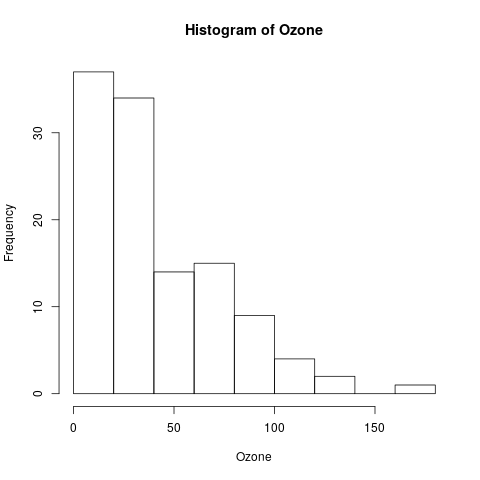
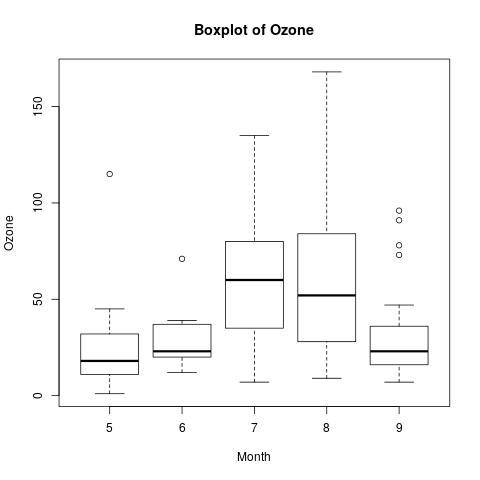
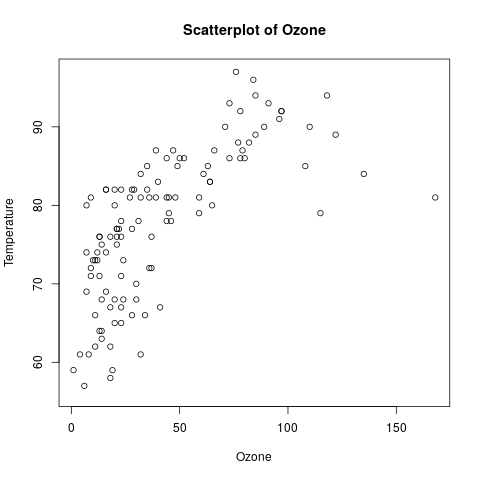
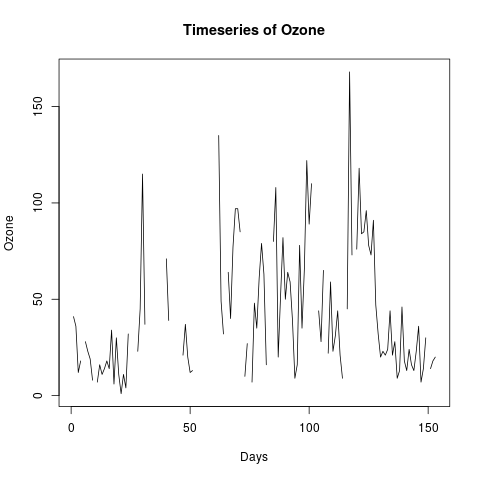
Fig.1: Discrete and continuous data graphs.
Representatives of this category are for example bar charts and boxplots. Examples for both are given on the left in Fig. 1. As for the majority of examples we present, they are generated from sample data on air quality given in R and can therefore be easily reproduced. Histograms are a common form used to represent the frequency of data points in different categories. Particular types of bar charts include histograms, where data is clustered into discrete intervals that are given on the x axis, while the frequency of points in each interval is given along the y axis. Thus a histogram uses area to convey information to represent frequencies as an effective visual medium. Boxplots on the other hand use both areas and points to convey different aspects of the data being represented.
Although these graphs and their underlying data are not necessarily continuous in a strictly mathematical sense, they are meant to visually convey information that relies on the continuous interpretation of all data. That is, contrary to the discrete graphs, where, for instance, single bars conveyed interesting information in their own right, in continuous data graphs the visual representation of single data points is meaningless without considering their relationship to some or all other data points in the graph. Therefore, we can say that while the data can be discrete, their interpretation has to be continuous. Examples of these kind of diagrams are scatter plots or time series as given in Fig. [fig:data-graphs]. The data is discrete, in the sense that there is a finite number of data points that are clearly distinct. However, when reading the graph one is not concerned with the single points and their value, but rather with the curve represented by the overall arrangement of the points in the two-dimensional grid, as well as with respect to the uniformity distribution data points or clusters they form. Consequently, presenting data point by point to a blind reader would be absolutely useless.
Our goal is to support blind users to work with statistical models, both by manipulating them and visualising data, while perceiving the same information as their sighted peers. While for the model manipulation we have chosen the R statistical software application (R Core Team 2017), the visualisation is achieved by producing accessible SVG graphics in a browser.
R is a programming language and software environment for statistical computing that allows the efficient manipulation of statistical data and their visualisation offering a host of different diagrams and rendering options. As R is commonly used by working statisticians, both in academia and industry, integrating the ability to generate accessible graphics directly should decrease the hurdle for adoption. R has multiple graphics systems (Murrell 2011); we use the grid system together with the gridSVG package (Murrell and Potter 2014) as output device, as it provides sufficiently detailed hierarchical structures in the SVG to support the type of interactive navigation that we aim to achieve.
This navigation relies on annotating the SVG with an XML structure that effectively describes the semantic components of a diagram in hierarchical graph structure. We use the BrailleR (Godfrey 2016) package --- an R add-on specifically targeted at blind users --- to extract detailed information, such as data ranges, grammatical constructs, etc. to generate speech strings that are embedded into the XML annotation. This structure is then used by a JavaScript library called DIAGcess (Sorge 2016), which enables the interactive exploration of the SVG diagrams in any browser, with screen reading, synchronised highlighting and magnification.
The typical workflow for a working statistician in a statistical software environment like R is a recurring process of model refinement which consists of repeated data generation and manipulation, data inspection and visualisation, which in turn leads to an adaptation of the data and modification of the current statistical model. To adequately support this workflow for blind people we have to interlink the work in the statistical computation package with a means for interactive data inspection. Interactive work in R can be conducted in a number of environments, such as
Data visualisation in R is directly supported by offering a number of graphics devices to display output, generally in a bitmap format or in vector formats like PDF or SVG. Visualisation can be done directly from within R's working environment, which leads to a new pop up window containing a canvas with the visualisation graph. Unfortunately, this canvas is entirely inaccessible, even for vector based graphics devices. To make data visualisation accessible we generate the SVG diagrams in R together with the XML annotation necessary for DIAGcess. As the latter needs JavaScript to run we have decided to displaying visualisations in a browser tab instead of the R canvas. Consequently BrailleR offers a call to generate accessible diagrams, which sends the SVG and XML annotations to the browser. The newly opened browser tab is automatically focused, meaning that the R user can directly start exploring the visualisation. Once the graph has been inspected the user can close the tab shifting focus back to the R environment.
The visualised data can then be explored using a hierarchical navigation model, which breaks down the data exploration over multiple layers of abstraction, starting from a summary of the entire diagram all the way down to the exploration of small details. DIAGcess supports this model with a simple arrow key navigation between elements. If an element is composed of multiple children, it can be further explored by using the down arrow key. Left/right arrows then allow the user to move between the children of this layer, drilling further down if possible and so desired, or back up on the more abstract layer using the up arrow key. In each step the components of the diagram under consideration are screen read either with a short or detailed description, depending on the user's preference settings, and the elements that are currently described are also visually emphasised in the SVG using highlighting and magnification.
Our navigation model for statistics diagrams is currently geared towards the types of two dimensional data visualisations that we currently support and is broadly similar for all the diagrams. It can be divided into a common and a plot-specific part, where the latter provides different means of data exploration depending on the type of diagram. We generally work with at least three layers that comprise:
top level summary,
major component layer, and
single component exploration.
The top level summary is the root of our tree and is constituted of the entire diagram. This corresponds to the left-most diagram in Fig. [fig:step-wise-exploration-data-layer]. During exploration all diagram components are highlighted in yellow and the accompanying speech string read by the screen reader is then "5 boxplots for Ozone" or in verbose mode "5 boxplots for Ozone for Months 5 to 9".
Fig.2: Stepwise exploration of the Ozone boxplot
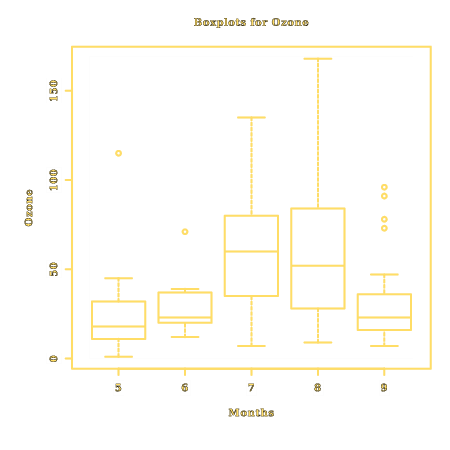
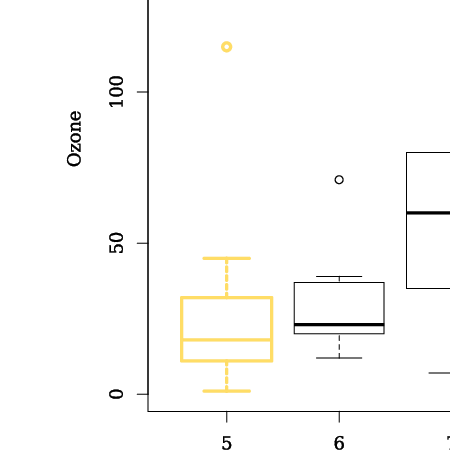
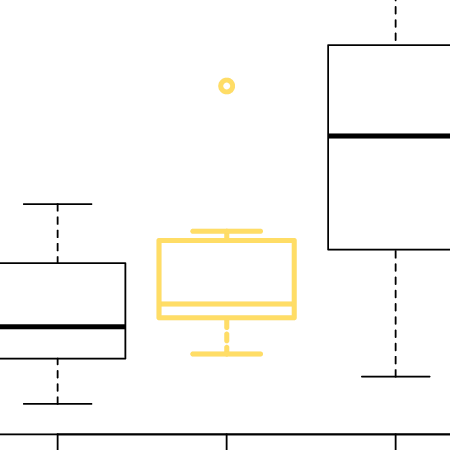
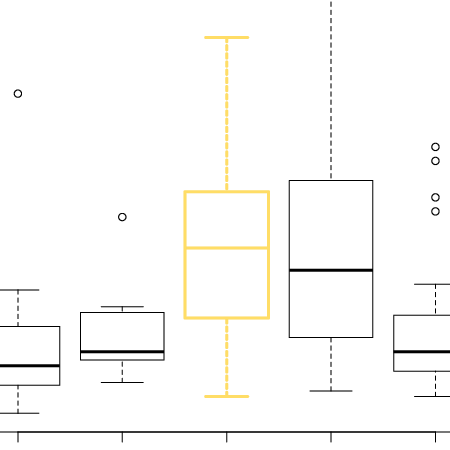
As mentioned the particular navigation model for data exploration depends on the type of data visualisation we work with. Nevertheless the basic structure of the exploration follows the pattern depicted in Figure [fig:step-wise-exploration-data-layer]. First the entire data content is summarily presented. When diving deeper, single data elements can be explored step by step, and if available, the user can delve for additional details. Obviously both descriptions and level of details differ for different visualisation methods, but most importantly, what constitutes a data element differs for discrete or continuous data graphs.
For discrete data graphs defining data elements is a relatively easy task. We simply take all the discrete elements (e.g., bars, boxplots) to define the navigational layer. Since their visual components are grouped in a single group element in SVG, which we can refer to them directly in our XML annotation structure. The single elements of the graph can then be explored step by step from left to right.
For example, Figure [fig:step-wise-exploration-data-layer] presents the exploration of three single boxplots for Ozone values over the given months. There are altogether five boxplots, which can be stepped through, with synchronised highlighting and magnification as well as aural descriptions of the form "Boxplot for month 5. Quartiles 1, 11, 18, 32, 45. 1 outlier." or in verbose mode "Boxplot for month 5 for 26 data points. Minimum 1, lower quartile 11, median 18, upper quartile 32 and upper whisker 45. 1 outlier at 115." Note, that there are a wide range of words in common use for some ideas and we aim to provide easy customisation in the future.
For each boxplot the user can dive even deeper into the structures, exploring four different components: medians, estimates of lower and upper quartiles, lower and upper whisker ends, and the presence of outliers. The exploration of the rightmost boxplot of our example would result in
To enable a meaningful exploration in the case of continuous data graphs, some additional processing to fit our navigation model is needed. To be more specific, in order to consider exposing particular properties of graphs we often break up their data into separate components. This is often done quite artificially, but in many instances we can exploit discontinuities to discretise the curve. If these are not available, we have the option of breaking the curve recursively into equally spaced parts, introducing potentially multiple additional layers into the navigation model.
Our testing during development has been done on all major operating systems. Most of the blind people contacted for assistance with evaluation are Windows users who are blind and making use of at least one of JAWS (Freedom Scientific 2016) and NVDA (NVDA Team 2017) screen readers. Our development phase testing has been conducted in a variety of browsers (Chrome, Firefox, Safari, IE11, Edge, Opera, Konqueror), but our evaluators commonly used Firefox, Google Chrome, or Internet Explorer as their default browser. There are known technical limitations with some browsers which cannot render SVG content. Unfortunately, use of older operating systems and associated browsers by some evaluators is a problem to acknowledge. In order to overcome this problem, we suggested use of Firefox so that we could get feedback on the interactive exploration.
We asked a group of 10 power users to test our implementation and in particular the generated statistical diagrams. While many of these users have a good background in mathematics, most had little knowledge of R. All users have offered favourable feedback on the interactive exploration approach we have taken. Three of these users are blind and either are completing or have completed a PhD in statistics or a closely related discipline, while two more blind users are vastly experienced in programming and managing web content; this pair of respondents both knew what they were doing in terms of the interactivity, but did not fully understand the data information conveyed. One of these respondents decided that text strings were too long but failed to navigate them in details with NVDA review mode.
One of the former group of users took the simple code demonstration we offered and extended it beyond our request; he was able to experiment to the point he could replicate some bugs we had already encountered during development. These issues have been rectified and we are confident that once developments are incorporated into the public release versions of packages we depend on, this user's experiments will lead to the desired outcome. We did not direct users towards a particular mode of operating R; there are many ways of doing so and personal preferences ought to show any deficiencies in our work. Our own development phase testing ensured the accessible content could be obtained using R in a variety of modes commonly used by blind users (R in terminal mode and in the R GUI console) and in some modes not commonly used by blind users (from the shell (bash, tcsh), Emacs, and RStudio; all within Ubuntu).
Only one blind student currently engaged in an introductory course was able to give feedback. This was favourable; she was able to understand the graph's content and interactivity. Several novice users felt they would not have sufficient of the material being covered to make any useful contribution. One respondent from this group came forward and noted that she needed to know a lot more about the way the graph looked in a spatial sense before she would understand the information being conveyed by the interactive exploration. Once she was given the instructions that would have suited a student who was either in or had completed an introductory course she positively benefited from the interactivity.
Other feedback included that blind users want information on their refreshable braille displays as well as explore with a variety of feedback mechanisms including sonification of the content. These features are not yet implemented, but provision of braille via a refreshable display is a high priority.
Our work aims to increase the effectiveness and efficiency of blind people to interact with statistical material. We have placed a great deal of emphasis on the ability to generate the accessible version of statistical graphs with as little extra work as possible being needed by the blind user. The navigation model provides users familiar with the data model a means for inspecting the visualisation without the need for additional hardware or software. Technically at present, the production of accessible statistical diagrams works well for the gridSVG package as it provides sufficiently rich SVG, however the objective is to extend it also to other renderers in R as well as to a host of other statistical graphs.
Development of the presented work benefited from feedback from a number of interested blind users during the development phase. While our initial user studies were aimed at power users and experts, we are currently planning a user study with school children that learn about graphs like histograms and boxplots. This should not only allow us to obtain more statistically relevant feedback but also give us an idea how adequate the textual descriptions of the diagrams are for early learners. Currently, they have been provided by experts for experts, which might not necessarily be the correct level for school children. Nevertheless, our evaluation to date shows that the interaction we offer does help blind people who understand the content, while there is still demand for additional information like Braille feedback and sonification. But despite these limitations we believe the work is a significant step towards providing blind people with greater access to statistical diagrams and we feel it goes some considerable way to enabling both students and professionals greater possibilities to equally participate in education and employment.
Brown, L., S. Brewster, S. Ramloll, R. Burton, and B. Riedel. 2003. "Design Guidelines for Audio Presentation of Graphs and Tables." In Proc. on Auditory Display.
Calder, M., R. Cohen, J. Lanzoni, and Y. Xu. 2006. "PLUMB: An Interface for Users Who Are Blind to Display, Create and Modify Graphs." ASSETS’06, 263–64. www.catea.gatech.edu/scitrain/kb/FullText_Articles/PLUMB.pdf.
Cohen, R., A. Meacham, and J. Skaff. 2006. "Teaching Graphs to Visually Impaired Students Using an Active Auditory Interface." ACM SIGCSE Bulletin 38 (1). ACM: 279–82.
Ferres, L., P. Verkhogliad, G. Lindgaard, L. Boucher, A. Chretien, and M. Lachance. 2007. "Improving Accessibility to Statistical Graphs: The iGraph-Lite System." ASSETS’07, 67–74.
Freedom Scientific. 2016. JAWS Version 18. St. Petersburg, FL. http://www.freedomscientific.com/.
Gardner, J., and V. Bulatov. 2008. "Making Scientific Graphics Accessible with Viewplus Iveo." In Proc. of Int. Conf. on Technology and Persons with Disabilities. http://www.viewplus.com/about/abstracts/08csungardner3.html.
Godfrey, A. Jonathan R. 2016. BrailleR: Improved Access for Blind Users. Massey University. http://CRAN.R-project.org/package=BrailleR.
Godfrey, A. Jonathan R., and M. Theodor Loots. 2015. "Advice from Blind Teachers on How to Teach Statistics to Blind Students." Journal of Statistics Education 23 (3): 1–28.
Mielke, D., N. Pitre, and S. Doyon. n.d. "BRLTTY." http://mielke.cc/brltty/.
Murrell, P. 2011. R Graphics. The R Series. Chapman & Hall/CRC Press.
Murrell, P., and S. Potter. 2014. "The gridSVG package." R Journal 6 (1): 133–43. http://journal.r-project.org/archive/2014-1/RJournal_2014-1_murrell-potter.pdf.
Nazemi, A., and I. Murray. 2013. "A Method to Provide Accessibility for Visual Components to Vision Impaired." Int. Journal of HCI 4 (1): 54.
NVDA Team. 2017. NVDA Version 2017.1. http://www.nvaccess.org/.
R Core Team. 2017. R: A Language and Environment for Statistical Computing. Vienna, Austria: R Foundation for Statistical Computing. https://www.R-project.org/.
Raman, TV. n.d. "Emacspeak." http://emacspeak.sourceforge.net.
RStudio Team. 2015. "RStudio: Integrated Development for R." RStudio, Inc., Boston, MA URL Http://Www.rstudio.com.
Siegert, S., and R. Williams. 2017. Sonify: Data Sonification - Turning Data into Sound. https://CRAN.R-project.org/package=sonify.
Sorge, V. 2016. "Polyfilling Accessible Chemistry Diagrams." In Proc. of 15th Icchp, 43–50. Springer.
Sorge, V., M. Lee, and S. Wilkinson. 2015. "End-to-End Solution for Accessible Chemical Diagrams." In Proc. of the 12th W4a Conference, 6:1–6:10. ACM.
Yu, W., K. Kangas, and S. Brewster. 2003. "Web-Based Haptic Applications for Blind People to Create Virtual Graphs." In Proc. of Haptics 2003., 318–25. IEEE.